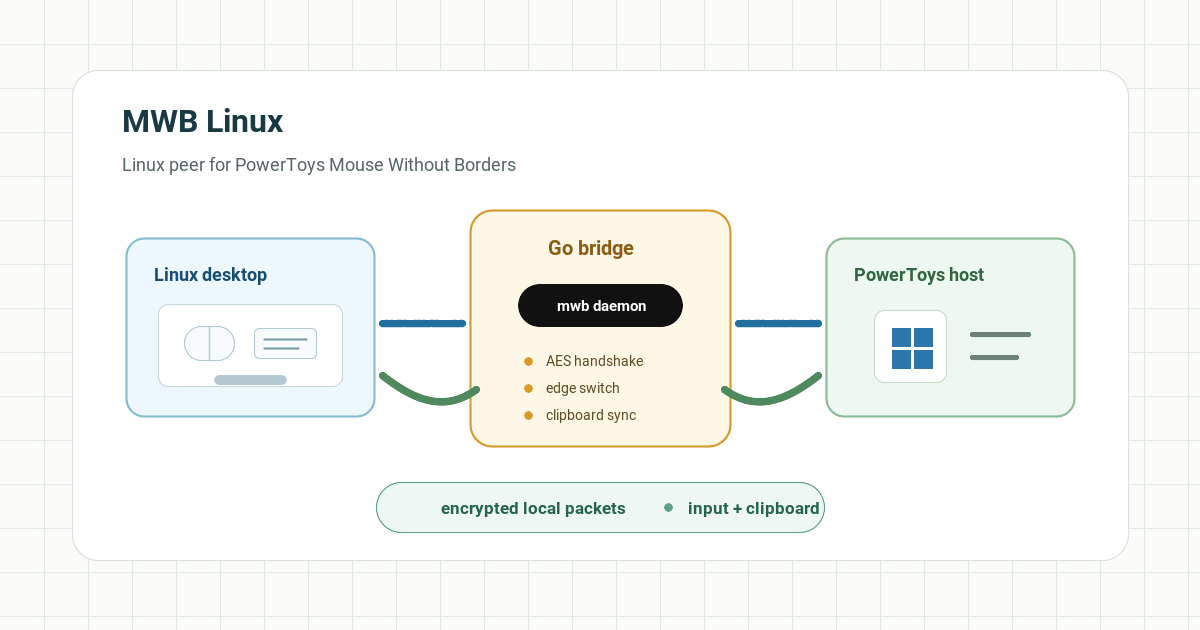
A native Linux client for Microsoft PowerToys' Mouse Without Borders (MWB). Move your mouse to the edge of the screen and the cursor moves to the other machine, along with your keyboard and clipboard, with no extra software needed on Windows beyond PowerToys.
Why I built it
Mouse Without Borders only ships as a Windows-side PowerToys feature. There was no native Linux client implementing the same protocol, so switching between a Linux desktop and a Windows machine meant KVM hardware or a clunkier remote-desktop workaround. MWB Linux implements the protocol directly: a single ~5MB binary, no GUI dependencies.
Who this is for
- People who already use PowerToys Mouse Without Borders on Windows and want a Linux machine in the same desk setup.
- Developers who want keyboard, mouse, and clipboard sharing without running a full remote desktop session.
- Linux users who are comfortable with X11-side input tooling and want the protocol work to be visible in the repo.
What it does
- Bidirectional mouse sharing: control both machines from either keyboard/mouse
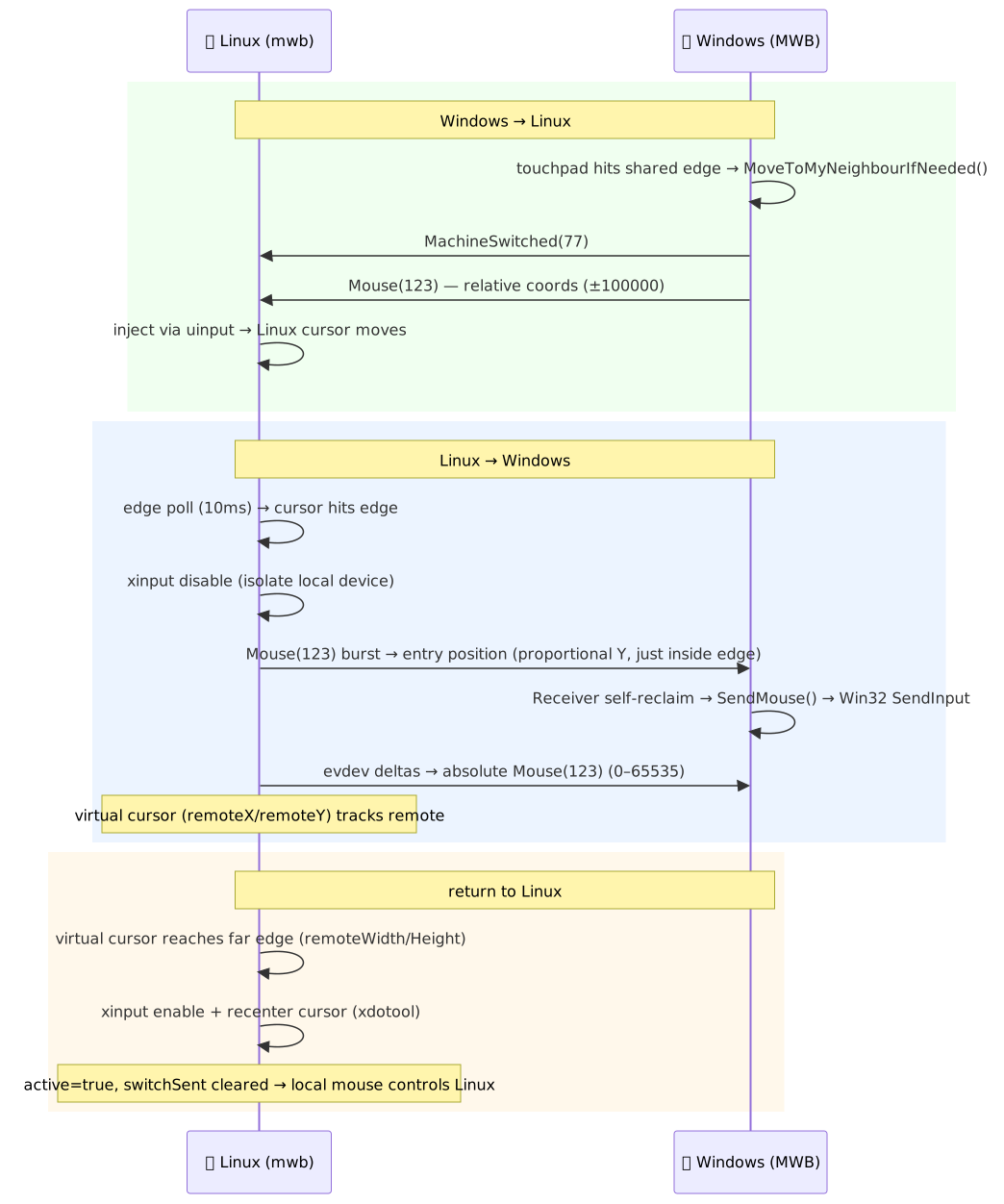
- Edge switching: move the cursor to a screen edge, then continue on the other machine
- Clipboard sync for text and images in both directions
- Keyboard forwarding, including scroll wheel and side buttons
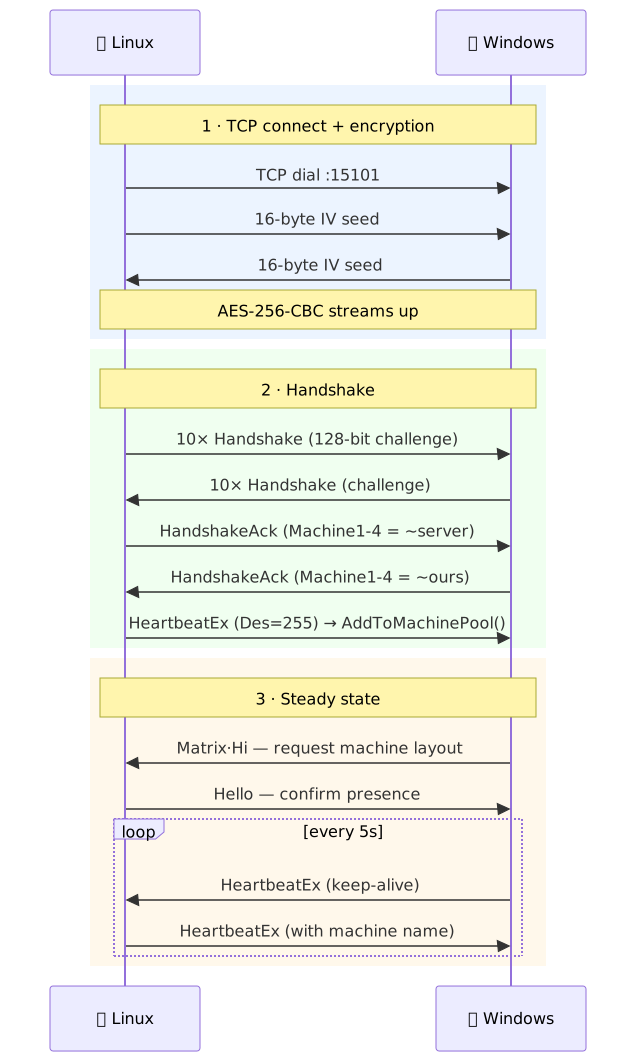
- AES-256-CBC encryption with PBKDF2 key derivation
- Device isolation so the local cursor doesn't move while controlling the remote machine
Architecture
The client runs a dual-mode connection (listens and connects outbound, first one wins), does an encrypted challenge-response handshake, sends proactive heartbeats every 5 seconds, polls for screen edges every 10ms in bidirectional mode, and forwards input as MWB protocol packets. Device isolation now uses exclusive EVIOCGRAB grabs on physical evdev devices; the kernel releases them if the process exits or crashes. Current implementation notes are in the repository's architecture doc.
Build decisions
I kept the first release as a command-line Go client rather than a tray app. That made the hard part visible: protocol compatibility, connection lifecycle, heartbeats, packet forwarding, clipboard sync, and input isolation. A GUI can come later; a GUI without a reliable protocol bridge would only make the project look more finished than it is.
The second decision was to document the desktop-environment boundary instead of smoothing it over. X11 exposes the control points this project needs for edge detection and device isolation. Wayland does not expose the same surface in a uniform way, so the project treats Wayland support as receive-only rather than pretending all Linux desktops behave the same.
Honest limitations
Bidirectional mode currently requires X11 or XWayland for edge detection and cursor repositioning. Receive-only input works through Linux uinput without an X11 capture backend. Native Wayland capture and clipboard support still require compositor or desktop-portal integration.
Project artifacts
- Repository with source, install script, and README.
- Releases for versioned binaries and packages.
- Architecture notes describing the protocol bridge and implementation boundary.
Install
curl -fsSL https://raw.githubusercontent.com/lucky-verma/mwb-linux/main/scripts/install.sh | sudo bashOr build from source, or grab a versioned .deb/binary from Releases. Full instructions in the README.